Calendar
The department calendar includes campus holidays, seminar schedules, thesis/dissertation defenses and other department wide events. The calendar is based on a shared Google Calendar and can be viewed on the web or by subscribing to it in your UMD Google account.
Viewing on the web
There are two ways to view the calendar on the web.
A list of public events can be viewed at https://www.geol.umd.edu/department/calendar.php. This is generally seminars and public thesis/dissertation defenses. There is a login button that will allow you to log in and view the full calendar up to a year in the future.

To view the calendar on the Google Calendar site where you can view past and future events, use this link: https://calendar.google.com/a/umd.edu/embed?src=umd.edu_58haj018fn7m1hc3v4htjui870@group.calendar.google.com. You will need to log into your UMD account to view this page.

Subscribe to the Department Calendar in your Google Account
The easiest way to keep up to date with the department calendar is to subscribe to it from your own Google Calendar. Then, you can view it in the sidebar in GMail or in your Google Calendar.
To subscribe to the department calendar, click this link: https://calendar.google.com/calendar/a/umd.edu/?cid=dW1kLmVkdV81OGhhajAxOGZuN20xaGMzdjRodGp1aTg3MEBncm91cC5jYWxlbmRhci5nb29nbGUuY29t
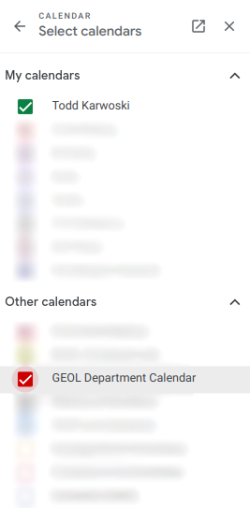
This should automatically add it under "Other Calendars" in your Google Calendar. To view it in GMail,
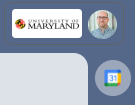
- On the right side of GMail, click the Google Calendar icon to open the calendar in the sidebar.
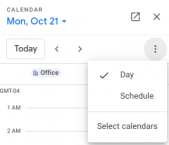
- Click the three dot menu icon and click "Select calendars"
- Look for the "GEOL Department Calendar" under "Other Calendars" and make sure the box is checked.
- Click the back button to go back to the calendar view and you should now see the department calendar events in your GMail calendar view. You may need to view a different day to see the calendar events.