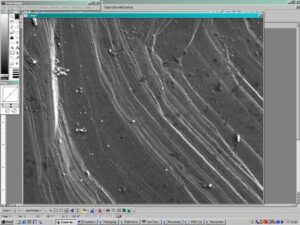
Procedure to Import Images from Probe into Scion Image/NIH Image
Images on the 8900 Superprobe are stored in a compressed proprietary TIFF format. In order to view them on other computers, the files need to be uncompressed an opened using Scion Image or NIH Image (an alternative is to do this under the OTHER menu directly on the probe).
- Connect to the probe from a PC/MAC using some form of SSH-compatible FTP (e.g.http://www.ssh.com/). Identify the proper directory, and be sure that in your transfer program that you have the toggle for viewing hidden files on (the files are in directories entitled.map)
- Download the files to your local computer (it is often easier to download the entire directory structure).
- In the download directory, you will find files 0.cnd, 1.map 1.*.pm [where * is SL, CP, or ...). Using a decompression (ZIP) program, unzip the file 1.map.
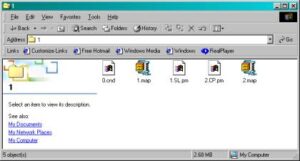
(In this case the files 1.map and 2.map are the uncompressed versions of the maps).
- Open Scion Image (PC) or NIH Image. Scion Image is available free from http://www.scioncorp.com/.
- Determine the resolution (e.g., 1024x1024, o r500x500) of the map that was collected on the probe. This can be done wither by looking at the resolution printed directly on the output. Alternatively, open the file 0.cnd and look for the value for the variable X/y-axis Step Number [1~1024] (an example of a 0.cnd file is reproduced below).
0.cnd
2                    Number of measured elements [1~20]

0                    Number of processed elements [1~20]

1                    Number of measurement sequences [1~20]

1                    Dummy Data  No.2

1                    Dummy Data  No.0

1                    Dummy Data  No.0

15.0                 EOS Acc. Voltage [kV]

17                   EOS CL [C]

250                  EOS CL [F]

209                  EOS OL [C]

751                  EOS OF [F]

0                    EOS Probe Diameter [um]

200                  EOS Mag.

O                    EOS On[O]/Off[f] Probe Scan

SPT                  EOS Scan Mode

TV                   EOS Scan Speed

8.113e-09  8.108e-09  8.117e-09  Probe Current Avg, Before After [A]

0                    EDS Energy Full Scale [kV] 10/20/40

0                    EDS Spectrum Data Point [1024/2048]

L                    EDS Measuring Mode [L:Lib /R:Real Time]

0                    EDS Measuring Time

0                    EDS Aperture No. [0~5]

B                    Stage[S] or Beam[B] Scan

42.5476              Measurement Center Position X [mm]

59.1358              Measurement Center Position Y [mm]

11.0000              Measurement Center Position Z [mm]

-512.0000            Measurement Start Position X [mm]

511.0000             Measurement Start Position Y [mm]

11.0000              Measurement Start Position Z [mm]

1024                 X-axis Step Number [1~1024]

1024                 Y-axis Step Number [1~1024]

1.00 51.047          Beam Dots Width and Beam Calib Value

1.00 51.047          Beam Dots Width and Beam Calib Value

42.0000              Z-B Coordinate [mm]

59.0000              Z-C Coordinate [mm]

11.0000              Z-D Coordinate [mm]

U                    Scan Direction U:Single/B:Double

2                    Data Byte Length [2:16bit / 4:32bit]

300                  Dwell Time [msec]

200                  Scan Mag. [Onle Beam Scan Mode]

Pyrite Cube Surface (Starting)

Apr 28 14:12 2002

SL                   Element Name No.1-Seq.1 **********

I                    X-ray Name

0                    X-ray Order

I                    Signal Name [W:WDS E:EDS I:IMS]

6                    Channel Number[1-5:WDS 8-15:EDS 6,7:IMS]

SEI                  Crystal Name

0                    Crystal Number

0                    IMS Dummy Data

0                    IMS Dummy Data

0                    IMS Dummy Data

0                    IMS Dummy Data

0                    IMS Dummy Data

0                    IMS Dummy Data

0.0000               Coefficient A  count/msec/uA/wt%

0.0000               Coefficient B  count/msec/uA

0.0000               Coefficient C

0.00                 Scale M

0.00                 Bias N

2040                 Max Value

0                    Min Value

703                  Ave Value

1                    Accumulation Number [Only Beam Scan]

CP                   Element Name No.2-Seq.1 **********

I                    X-ray Name

0                    X-ray Order

I                    Signal Name [W:WDS E:EDS I:IMS]

7                    Channel Number[1-5:WDS 8-15:EDS 6,7:IMS]

COMPO                Crystal Name

0                    Crystal Number

0                    IMS Dummy Data

0                    IMS Dummy Data

0                    IMS Dummy Data

0                    IMS Dummy Data

0                    IMS Dummy Data

0                    IMS Dummy Data

0.0000               Coefficient A  count/msec/uA/wt%

0.0000               Coefficient B  count/msec/uA

0.0000               Coefficient C

0.00                 Scale M

0.00                 Bias N

1360                 Max Value

0                    Min Value

966                  Ave Value

1 Accumulation Number [Only Beam Scan]- Go to FILE then IMPORT and a new window opens.
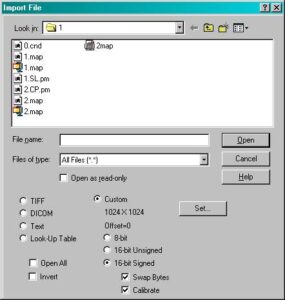
- Depress the buttons Custom, 16-bit Signed, and put a check next to Swap Bytes.
- Press the SET button, and a new window will open.
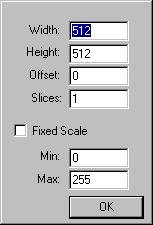
- Enter the resolution of the image/map in the Width and Height rows, followed by the OK button.
- Highlight the appropriate uncompressed map name, followed by the OPEN button and the image will read properly.